
Global Connectivity for Travelers: How to Get Internet Anywhere
You’ve just landed. Immigration is behind you. Your local SIM from three countries ago has no signal, airport WiFi requires a login that drops every fifteen minutes, and your transport pickup is waiting on a WhatsApp message you can’t send. This is the moment global connectivity matters — not as an abstract tech topic, but as an immediate operational problem.
This guide covers every method international travellers use to stay connected across airports, transit cities, and multi-country layover routes — what each one costs, where it breaks down, and what to have in place before you board the first flight.
There’s a particular kind of airport limbo that only regular layover travellers know: the forty-minute window between a delayed gate announcement and the next update, nowhere comfortable to sit, no data signal, no way to contact your hotel or rebook the transfer. Once you’ve lived it, you make different decisions about connectivity before you leave home.
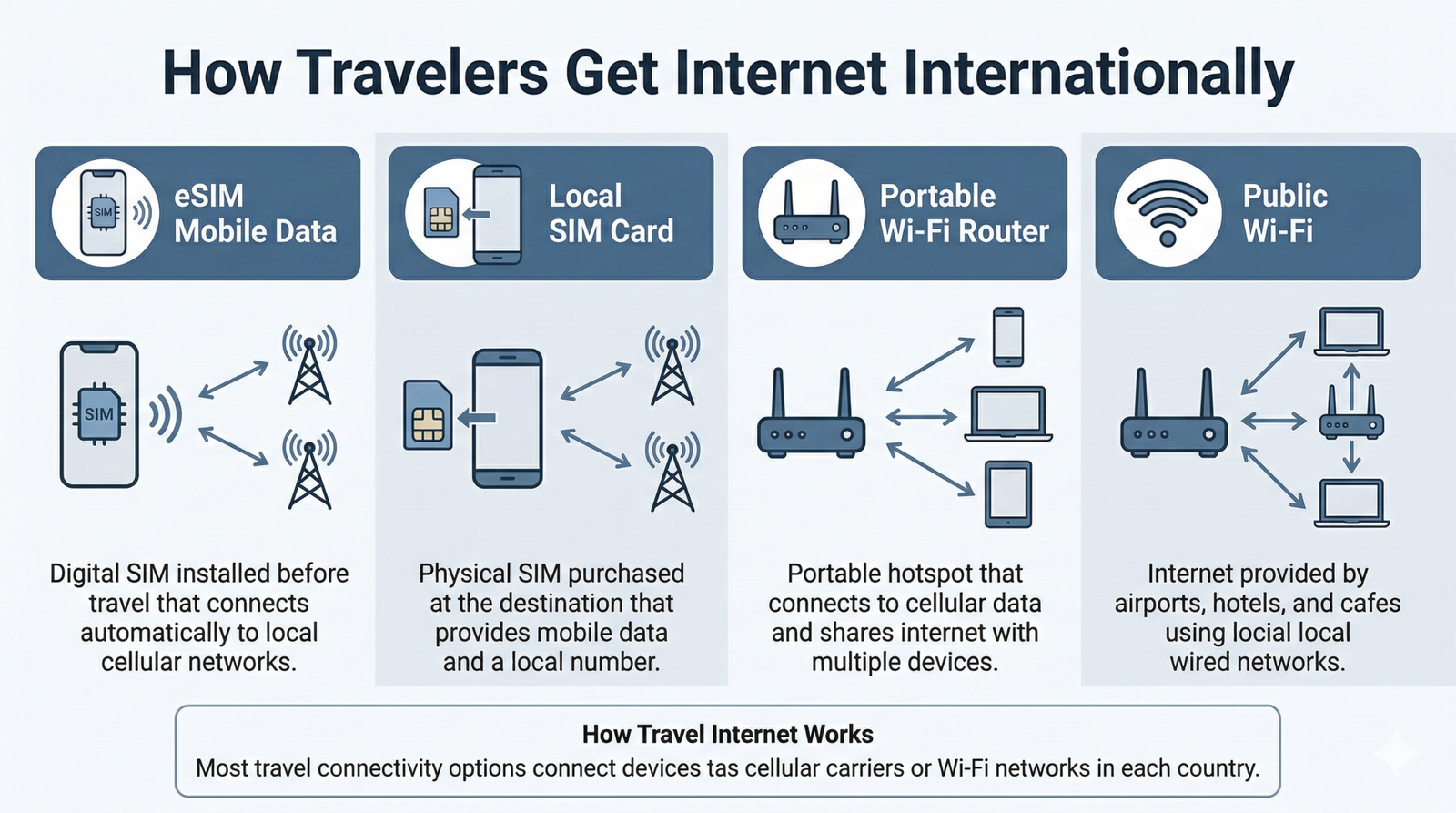
Most travellers get internet abroad through one of four methods: an eSIM installed before departure, a local SIM purchased on arrival, a portable WiFi hotspot, or public airport and hotel WiFi. For short layovers and multi-country routes, an eSIM is the fastest and most reliable option — it activates the moment your plane lands without a kiosk queue or a SIM swap.
- eSIM — best for short layovers, multi-country trips, instant activation
- Local SIM — best for stays of several weeks in a single country
- Portable hotspot — best for groups or multiple devices
- Public WiFi — fine for quick tasks, not for sensitive accounts
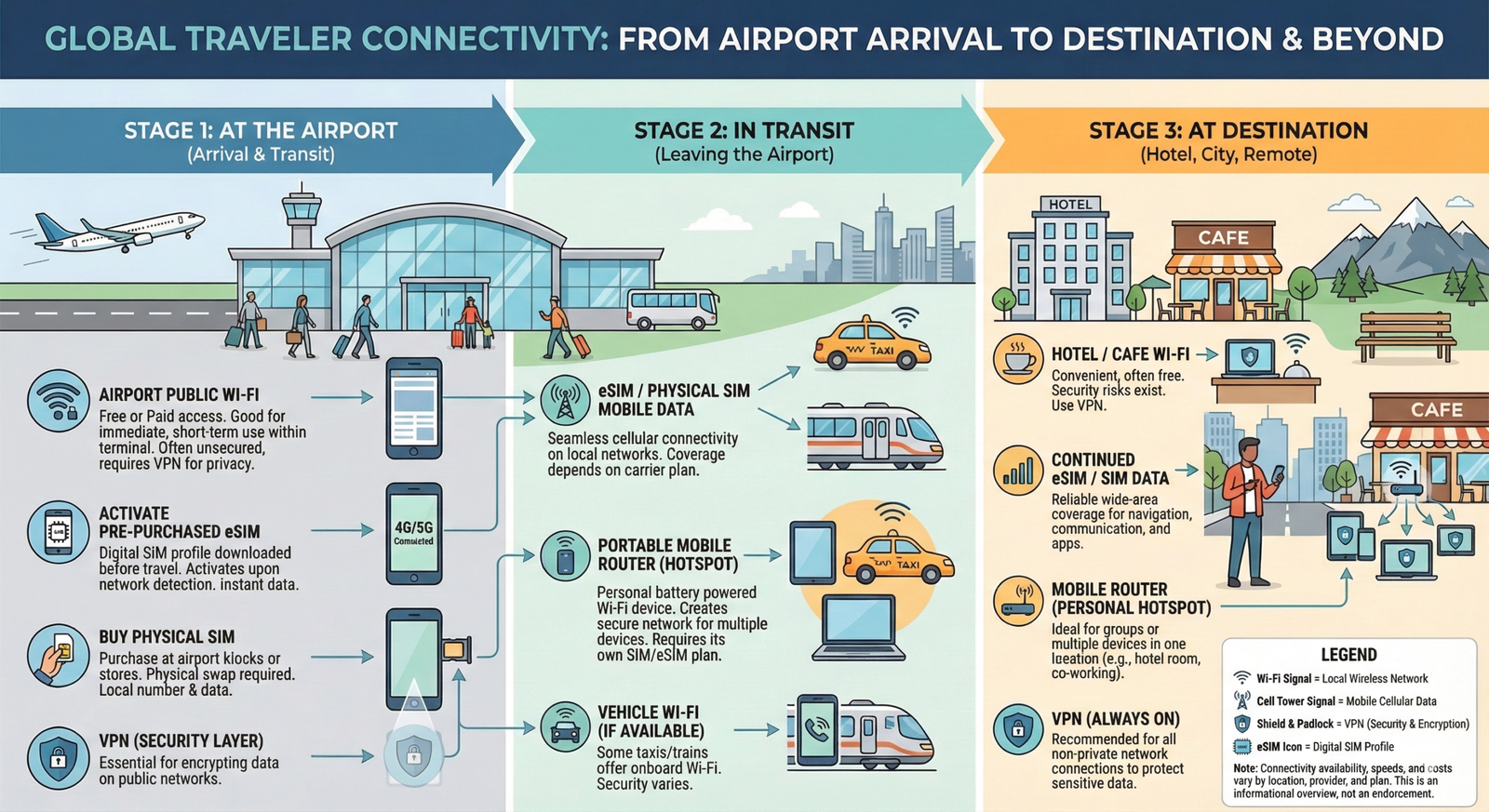
The airport arrival window is where connectivity decisions play out in real time. Your transport is booked, your accommodation has a check-in code, your connection details are buried in an email — and all of it requires a working internet connection you may not have thought to plan for.
There are three ways travellers typically get online after landing. Here’s how each one actually behaves in practice:
eSIM vs Local SIM: The Real Comparison
The eSIM versus local SIM question comes down to how long you’re staying and how many countries you’re crossing. For a layover traveller passing through Bangkok, Singapore, and Kuala Lumpur on one itinerary, a regional eSIM plan eliminates three separate SIM purchases. For someone spending six weeks in Japan, a local SIM from a convenience store will almost always be cheaper.
| Factor | eSIM | Local SIM |
|---|---|---|
| Setup time | Instant (pre-installed) | 15–60 min at kiosk |
| Multi-country use | ✅ Regional plans available | ❌ Usually one country only |
| Cost for short trips | Competitive at $22–38 | Can be cheaper |
| Cost for long stays | Can add up | ✅ Usually best value |
| Keeps home number | ✅ Yes | ❌ Usually no |
| Passport required | No | Some countries require it |
| Device requirement | eSIM-compatible phone | Any unlocked phone |
eSIM Providers Worth Knowing
Not all eSIM providers work the same way. Some sell fixed data packages by country; others operate a pay-as-you-go wallet you draw from as you travel. Here’s what each major player actually offers:
No fixed packages — you load credit into a data wallet and draw from it as you travel. Unused data doesn’t expire. The right call for irregular trip schedules where you can’t predict data consumption per country.
Check Roamless PlansThe most widely used travel eSIM platform. Country-specific and regional plans across Asia, Europe, the Americas, and the Middle East. Clean app, fast installation. A solid first choice for most travellers.
Check Airalo PlansSingle-country and regional eSIM plans with competitive pricing for Southeast Asia and Europe. Most useful when you know your route in advance and want to buy per-leg rather than a global wallet.
Check Nomad PlansSells unlimited data plans based on trip duration rather than data caps. Best for heavy users — navigating constantly, video calling, uploading content. Higher daily rate, but no risk of running out mid-itinerary.
Check Holafly PlanseSIM Price Benchmark: 5GB International Plan
| Provider | Approx. Cost | Pricing Model | Expiry | Best For |
|---|---|---|---|---|
| Roamless | Usage-based | Pay-as-you-go wallet | No expiry | Irregular travellers |
| Airalo | $27–35 | Fixed data package | 30 days | Most travellers |
| Nomad | $26–33 | Fixed data package | 30 days | SE Asia & Europe |
| Holafly | $30–42 | Unlimited by duration | 5–30 days | Heavy data users |
Portable Hotspots: When One Connection Isn’t Enough
A portable hotspot is a dedicated device that connects to cellular networks and broadcasts its own private WiFi signal. If you’re travelling with a partner, managing a laptop alongside your phone, or doing any kind of remote work from transit cities, a hotspot earns its place in the bag.
The argument against: you’re already carrying a phone with mobile data. The argument for: dedicated hotspots run longer on battery, support ten or more devices simultaneously, and don’t drain your phone doing double duty as both a data source and a navigation device.
Skyroam Solis
Reliable global hotspot with pay-as-you-go day passes. Not the fastest, but convenient for occasional use and widely supported across travel destinations.
Amazon →GlocalMe Portable Hotspot
Built-in cloud SIM technology for flexible carrier switching across borders. Popular among digital nomads running multiple devices throughout the day.
Amazon →Netgear Nighthawk M6
The premium option. 5G-capable, strong range, supports up to 32 devices. Overkill for most leisure travellers, but genuinely useful if you’re working from airports regularly.
Amazon →Once you’re at your hotel or stopover accommodation, the connectivity picture shifts from mobile data to fixed WiFi. Hotel networks are convenient but almost always shared, slow during peak hours, and should be treated as public networks for security purposes.
Most travellers end up using a combination of sources: hotel WiFi for large downloads and video calls, mobile data for navigation and anything that requires moving around the city, and occasionally a travel router to clean up a poor hotel connection.
Travel Routers: A Specific Tool for a Specific Problem
A travel router is a compact device that connects to a hotel’s wired or wireless network and rebroadcasts it as a private, password-protected signal of your own. This solves three distinct annoyances at once: the per-device login captive portal (you log in once through the router, not repeatedly across multiple devices), the shared bandwidth problem (you get a more stable allocation), and the basic security problem (your own encrypted network sits between you and the hotel’s infrastructure).
The GL.iNet Beryl AX is the model most frequently recommended for this use case — compact, travel-friendly, and capable of functioning as a repeater, wired client, or VPN endpoint. [GL.iNet Beryl AX Amazon link needed — please supply]
Multi-Country Layovers: The Connectivity Problem Nobody Plans For
A traveller flying Bangkok → Singapore → Kuala Lumpur is crossing three different cellular markets. A Thai SIM works in Thailand. A Singaporean SIM works in Singapore. At every border crossing, the device that worked perfectly for the last twelve hours becomes a useless rectangle.
This used to mean carrying multiple SIM cards and performing roadside SIM surgery in airport arrivals halls. Modern eSIM providers have largely solved this — regional plans covering Southeast Asia, Europe, or the Middle East handle network switching automatically as you cross borders.
| Route Leg | Old Approach | Regional eSIM Approach |
|---|---|---|
| Bangkok (Thailand) | Buy Thai SIM at Suvarnabhumi | eSIM connects to Thai carrier automatically |
| Singapore | Replace SIM at Changi kiosk | eSIM switches carrier at landing |
| Kuala Lumpur | Replace SIM again at KLIA | eSIM switches again — no action needed |
Which Option Is Right for Your Trip?
| Your Situation | Recommended Option |
|---|---|
| Short layover (under 24 hours) | eSIM — activates on landing, no queue |
| Multi-country itinerary | Regional eSIM — one plan, automatic switching |
| Long stay in one country (4+ weeks) | Local SIM — cheapest, direct carrier access |
| Multiple devices or remote work | Portable hotspot + eSIM combination |
| Budget-conscious, irregular usage | Roamless — no expiry, use only what you need |
| Heavy data (video calls, streaming) | Holafly unlimited for the duration |
| Hotel room, multiple devices | Travel router off hotel WiFi |
🔒 Security on Public Networks
Airport WiFi, hotel networks, and café connections are shared environments. A network password doesn’t make it private — hundreds of other guests may be on the same network segment.
Activities that carry real risk on public networks:
- Logging into online banking or financial accounts
- Accessing work systems with sensitive credentials
- Entering payment details for bookings
- Cloud storage containing personal documents
Basic precautions that actually help:
- Turn off automatic WiFi connection on your phone
- Enable two-factor authentication on important accounts
- Use your eSIM mobile data for anything sensitive — not airport WiFi
- A VPN encrypts your traffic on shared networks. Our VPN guide for international travellers →
Three Places to Photograph the Connected Traveller
Changi Airport T2 Rooftop Garden, Singapore — Phone in hand, tropical canopy overhead, full 5G signal. The contrast of greenery and technology frames itself. Shoot at golden hour when the garden lights activate.
Suvarnabhumi Airport SIM Market, Bangkok — The arrivals hall SIM kiosk corridor is genuinely photogenic. Competing operator signs, fluorescent light, staff in matching polos. Raw transit energy, completely authentic.
Dubai International Concourse A, DXB — The clean geometry of the terminal with desert light outside. Frame a device activation shot against the tarmac view. The late-afternoon transit light here is extraordinary.
The Bottom Line
For most international travellers — and almost all layover travellers — an eSIM installed before departure is the right default. It removes the airport queue, guarantees connectivity the moment you land, keeps your home number active, and handles multi-country routes without a SIM swap at every border.
Local SIMs remain the value option for extended single-country stays. Portable hotspots earn their place for groups and remote workers running multiple devices. Travel routers solve a specific hotel-WiFi problem for anyone doing serious work from transit cities.
The worst outcome is arriving with no plan — no local data, a dead airport WiFi session, and a transport booking you can’t access. The options above are all simple enough to set up before you board. There’s no reason to leave it to chance.
Some links in this guide are affiliate links. If you purchase a service or product through one of these links, Epic Layover may earn a small commission at no additional cost to you. We only recommend products relevant to international travellers. Affiliate partnerships help keep this site’s guides and tools free to access.
FAQ’s
What is the easiest way to get internet when traveling?
Installing an eSIM before your trip allows your phone to connect to a local cellular network immediately after landing.
Do eSIM providers have their own networks?
No. Most eSIM providers partner with local cellular carriers in each country.
Can I use WhatsApp or messaging apps with an eSIM?
Yes. Messaging apps work normally because they use mobile data instead of traditional phone networks.
Is airport Wi-Fi safe?
WiFi can be convenient, but it should be treated as a public network. Avoid logging into sensitive accounts unless the connection is secure.
Do portable hotspots work everywhere?
Portable hotspots work anywhere that cellular networks are available.