
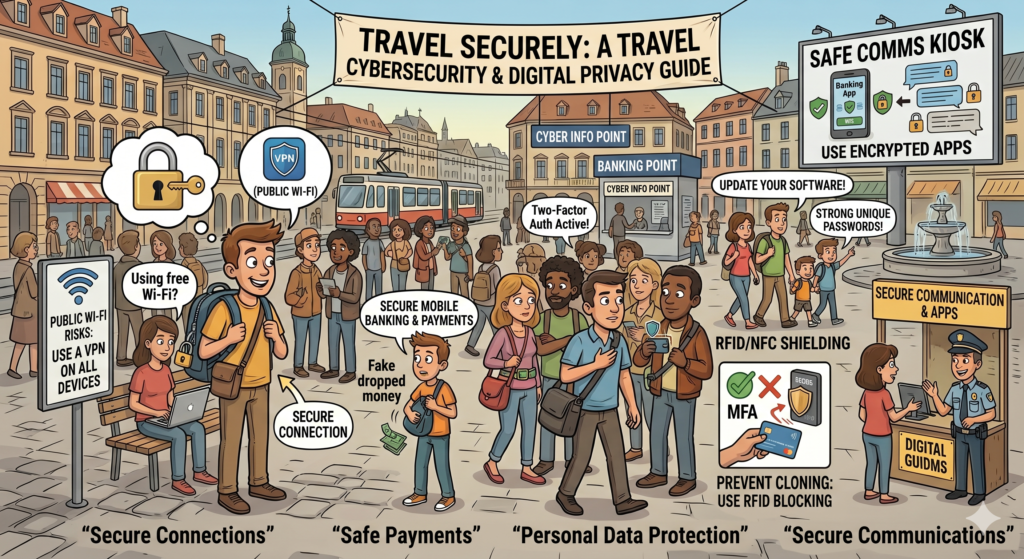
Travel cybersecurity in 2026 comes down to four things: a VPN running on every public Wi-Fi connection, two-factor authentication on every important account, an eSIM instead of relying on hotel networks, and a phone you can remotely wipe. Total cost runs around $10 per month. Setup takes twenty minutes. The protection is genuine, and the threats it stops are growing fast.
Why Travel Cybersecurity Matters in 2026
Five years ago, travel cybersecurity was an enthusiast topic. In 2026, it is mainstream — because the threat scale grew faster than most travelers realized. The FBI’s Internet Crime Complaint Center logged $16.6 billion in reported cybercrime losses in 2024, a 33 percent increase over 2023 (FBI IC3 Annual Report 2024). Phishing and spoofing was the most-reported crime category, with 193,407 complaints. Cryptocurrency-related complaints alone accounted for $9.3 billion in losses, a 66 percent year-over-year jump.
The relevant question for travelers is simpler than the headlines suggest: every public Wi-Fi connection, every login on a shared computer, every email from a “bank” or “airline” you didn’t expect — these are the attack surfaces. The defensive toolkit is cheap, accessible, and takes twenty minutes to install. This report covers the four layers that protect 99 percent of travelers from 99 percent of threats.
Why Public Wi-Fi Is a Real Problem
Every public Wi-Fi network — airport, hotel, café, train station — is shared with everyone else on it. The U.S. Cybersecurity and Infrastructure Security Agency (CISA) and the FBI both recommend treating public Wi-Fi as inherently untrusted and using a VPN whenever possible (CISA guidance on securing wireless networks). HTTPS encryption helps significantly, but doesn’t help with everything: app traffic isn’t always HTTPS, DNS lookups can leak metadata, and some apps still send sensitive data over unencrypted channels in 2026.
The Four-Layer Travel Cybersecurity Stack
Layer 1: VPN — The Foundational Tool
A Virtual Private Network encrypts all internet traffic and routes it through a secure server. To anyone else on the network — including a malicious operator — the traffic is unreadable noise. CISA’s official guidance recommends a VPN for any public Wi-Fi use.
What to look for in a travel VPN:
- AES-256 encryption — current industry standard
- Independently audited no-logs policy
- Servers in 60+ countries — important for accessing home content abroad
- Kill switch — automatically blocks internet if the VPN drops
- Multi-device support on a single subscription
NordVPN is the standard recommendation for most travelers — fast enough for streaming, simple enough for non-technical users, and one of the most extensively audited services in the industry.
Layer 2: Two-Factor Authentication on Every Important Account
Two-factor authentication means a password alone isn’t enough to access an account. Even when a password is captured, the account stays protected. The FTC’s identity theft guidance lists 2FA as one of the highest-impact protections available to consumers (FTC consumer guidance on 2FA).
Enable 2FA before flying on:
- Email (Gmail, Outlook, ProtonMail) — controls password resets for everything else
- Banking and travel money apps (Wise, Revolut, home bank)
- Apple ID / Google Account — controls phone backup, payments, autofill
- Social media — common targets for account takeover
- Booking platforms (Booking.com, Airbnb, airline accounts)
Use an authenticator app (Google Authenticator, Authy, 1Password’s TOTP) rather than SMS where possible. SMS-based 2FA is vulnerable to SIM-swap attacks, which the FBI flagged in 2022 as a growing threat.
Layer 3: eSIM — Your Own Data Connection
Travel eSIMs let travelers skip public Wi-Fi entirely for most of the day. A personal data connection is always more secure than a shared network — there’s no shared exposure surface.
Modern eSIMs are inexpensive ($5 to $15 for a week of data in most countries), activate before landing, and run alongside a home SIM. The leading options:
- Airalo — 200+ countries, packages from $5, the largest eSIM marketplace.
- Roamless — pay only for what’s used across 150+ countries, no expiry. Strongest for multi-country trips.
- Nomad — strong regional packages for Europe, Asia, the Americas.
Layer 4: Remote Wipe and Find My Setup
Before flying, set up the find-and-erase feature on every device. If a phone or laptop is stolen, this is what protects the data on it.
- iPhone/iPad: Settings → Apple ID → Find My → enable “Find My iPhone” and “Send Last Location”
- Mac: System Settings → Apple ID → iCloud → Find My Mac
- Android: Settings → Security → Find My Device
- Test it from another computer: log into icloud.com/find or google.com/android/find and confirm the devices show.
The 10-Minute Pre-Trip Checklist
- Enable full-disk encryption on phone and laptop. iPhones do this automatically. Macs require FileVault. Windows requires BitLocker. Android does it by default on modern devices.
- Set a strong device passcode — six digits minimum. Disable simple 4-digit codes.
- Enable biometric unlock (Face ID or fingerprint) — but know how to disable it quickly. In some jurisdictions, police can compel biometric unlock but not passcode disclosure.
- Update all software — phone OS, apps, browser, laptop OS. Most successful exploits target outdated software.
- Back up to cloud — iCloud, Google One, OneDrive. If a phone is stolen, restore everything to a new device within hours.
- Audit app permissions — revoke location, contacts, and photo access for apps that don’t need them.
- Install a password manager if you don’t have one — 1Password, Bitwarden, or the browser’s built-in manager. Stop reusing passwords.
- Set up the VPN on every device traveling.
- Test Find My / Find My Device from another computer.
- Email yourself photos of passport, insurance card, and bank card numbers — and save to encrypted cloud storage.
What to Do If Your Phone Is Stolen Abroad
Immediate Actions
- Find My / Find My Device from any computer. Mark as lost. Trigger remote erase if recovery looks unlikely.
- Change passwords on email, banking, and major accounts. Start with email — it controls password resets everywhere else.
- Freeze cards from a backup device or banking app on a different phone.
- Call the carrier to suspend service — prevents the thief using the number for SIM-based 2FA bypass.
- File a police report — required for insurance.
- Contact travel insurance. Most policies cover replacement devices up to a stated limit.
- Report to authorities: in the U.S., file at ic3.gov or reportfraud.ftc.gov. In the U.K., actionfraud.police.uk.
The 2026 AI Scam Wave — What’s New
The threat landscape shifted significantly with the AI capabilities that emerged in 2024 and 2025. Three new patterns matter for travelers:
- AI voice-clone family emergency calls. Scammers use audio scraped from social media to clone a traveler’s voice, then call family back home claiming an arrest or hospitalization abroad. The FTC has issued specific consumer warnings on this category (FTC alert on AI family emergency schemes). Defense: a family safe word that has never been posted online.
- Hyper-personalized phishing. AI-generated emails that perfectly mimic a bank, airline, or hotel using real travel data scraped from public sources. Defense: never click a link in an account email. Type the URL manually.
- Deepfake video calls. An emerging 2026 threat: scammers spoof video calls from “the bank’s fraud team.” Defense: hang up and call the bank directly using the number on the back of the card.
Resources and Help
- Account compromise check: haveibeenpwned.com — confirms whether an email has appeared in any major data breach.
- U.S. cybercrime reporting: FBI Internet Crime Complaint Center — ic3.gov
- U.S. consumer fraud: FTC — reportfraud.ftc.gov
- U.S. cybersecurity guidance: CISA — cisa.gov
- U.K.: Action Fraud — actionfraud.police.uk | National Cyber Security Centre — ncsc.gov.uk
- Canada: Canadian Anti-Fraud Centre — antifraudcentre.ca
- Australia: Australian Cyber Security Centre — cyber.gov.au | ScamWatch — scamwatch.gov.au
Bottom Line
Travel cybersecurity in 2026 isn’t paranoia. It’s closing the four obvious gaps that scammers and thieves exploit. A VPN, 2FA, an eSIM, and remote-wipe set up before flying — that’s the entire stack. Twenty minutes of work. Around $10 per month in subscriptions. The result: data, accounts, and identity stay yours, even when the physical phone is in someone else’s hands.
- FBI Internet Crime Complaint Center 2024 Annual Report — full data on cybercrime losses, complaint volume, and trends.
- CISA — Securing Wireless Networks
- FTC — Two-Factor Authentication consumer guidance
- FTC — AI-Enhanced Family Emergency Schemes alert
- U.K. National Cyber Security Centre — Travel guidance
Before the Trip
- EpicLayover’s Government Travel Advisory Directory — destination cybercrime warnings consolidated.
- Have I Been Pwned — check whether an email has appeared in any major data breach.
- FBI Internet Crime Complaint Center — file cybercrime reports and read current alerts.
- CISA Cybersecurity Advisories — US government threat intelligence on emerging digital risks.
- UK National Cyber Security Centre — practical individual cybersecurity guidance.